The Appointment Scheduler - Reschedule page allows users
to reschedule clients for appointments. This occurs at the clinic level.
Navigation Path:
Scheduling | Appt Scheduler | Reschedule
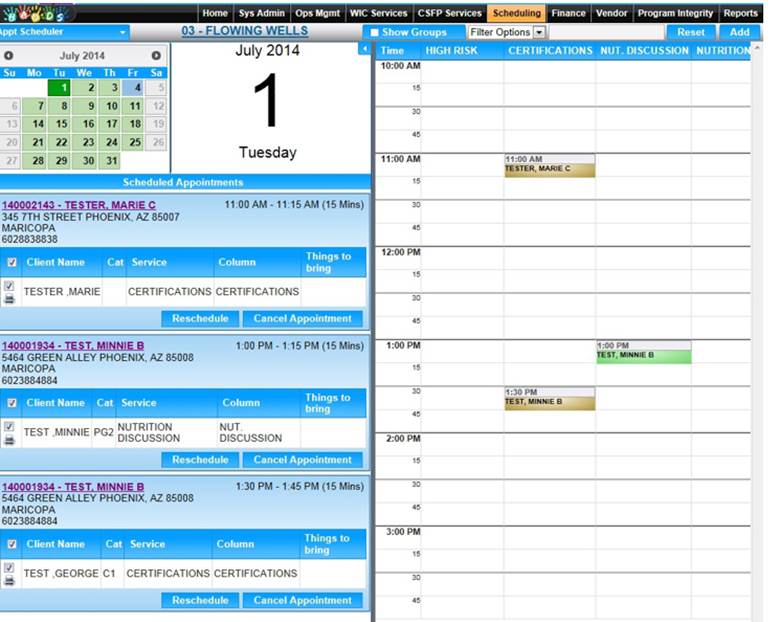
Module 6: Figure 16.1: Appointment
Scheduler - Reschedule
Fields:
- Month View (Calendar Date Setter) ––To
preview the scheduling for entire month with ability to set and the month
and scheduling date.
Appointment(s) that are getting rescheduled:
- Authorized Rep Name – Displays the
family name.
- Contact Information – Address and
Phone number but if the family have selected do not contact on phone and
mail, then the system shows DO NOT CONTACT.
- Client Name – Displays the Name of
the Client coming for the appointment.
- Start Time – Displays the Start
Time of the each appointment within the main family appointment that is
getting rescheduled.
- End Time – Displays the End Time of
the each appointment within the main family appointment that is getting
rescheduled.
- Cat – Displays the Category of the
Client.
- Service – Displays the Appointment
Type/Service.
- Column – Displays the service
provider column name, the appointment is booked.
Buttons:
- Reschedule– To reschedule
individual appointment or whole family appointment with the selected
timeslots.
- Cancel Reschedule – To cancel out
of the reschedule process.
Calculation(s):
Background Processes:
- Appt. Scheduler reloads with the filtered availability information
(mini month and columns) based off the services of the appointments that
are getting rescheduled.
- Based on reschedule appointments services and selected
timeslot services, system automatically maps the clients to the newly
selected reschedule timeslots so that user doesn’t have to assign
clients to selected timeslots manually.
- System blocks the user if selected timeslots are not
enough to use to reschedule appointments.
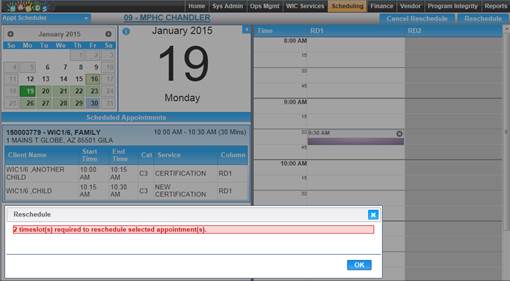
Module 6: Figure 16.2: Appointment
Scheduler – Multiple Time Slots

