The printing icon for the Appointment Notice and
Appointment Rescheduled Notice may be found both in WIC Services/Family
Appointments Page and in the Scheduling/Appointment Scheduler- Scheduled
Appointments List.
The printer icon beside the Client's Name should be
clicked on to access the print notice.
To access the printer icon in the WIC Services/Family
Appointments window:
- Go to WIC Services/Family Appointments Window
- You will see all the appointments scheduled for your
client at the top of the screen.
- Scroll down to the desired appointment if there is more
than one appointment for client. See below.
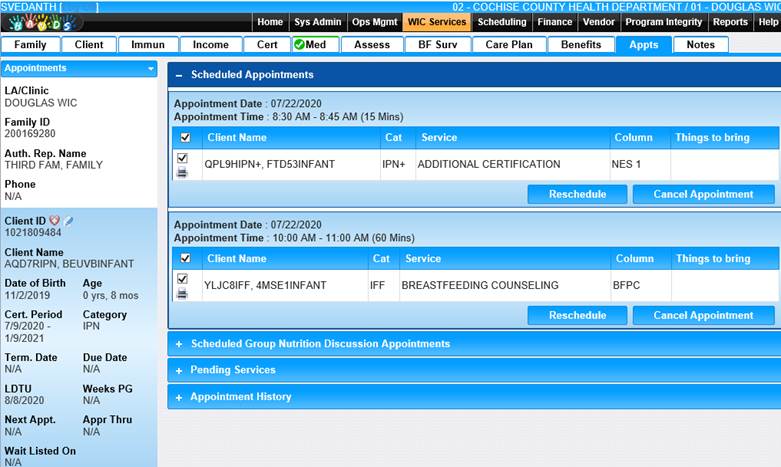
Module 6: Figure 19:
Appointments Page
- Click on the printer icon to access the print notice
box.
- Choose the appropriate notice.
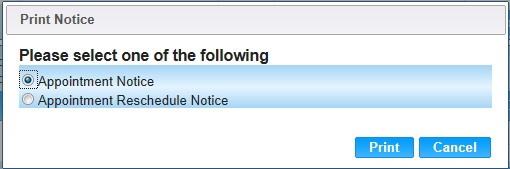
Module
6: Figure 20: Print Notice
- Click print.
- The selected Appointment Notice
and the printing options box will display
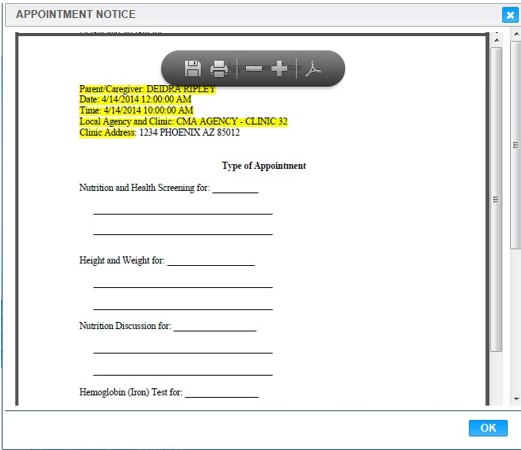
Module
6: Figure 21: Appointment Notice Printing Options Box
- Click the printer icon in the printer options box to
print the form.
- Click the OK button to close the box.

